Training an Object Detection model for Weightlifting Bars
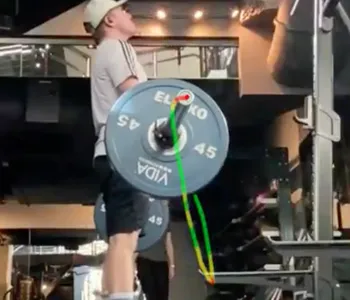
For my weightlifting tracking web application, LiftGenius, I wanted to add functionality that would allow users to visualize the path the bar takes while lifting.
I knew this could be accomplished using OpenCV and the built-in “tracker” classes it provides. Simply put, the tracker takes a known region of interest (ROI) defined by a bounding box, and attempts to “predict” where that box should be on the subsequent frame.
Having a user draw their own bounding box around an object is fine, but for LiftGenius, I wanted it to be seamless: A user uploads a video of themselves lifting, and like magic, they get a video back with the bar path laid over it.
In order for this to work “magically” for the end-user, I had to automate the where that bounding box should be!
I decided to use Facebook AI Research’s Detectron2, which is a machine learning framework built on top of PyTorch. It comes out-of-the-box with the very powerful Model Zoo, which allows for a transfer-learning approach to training models: why start from scratch when world-class models only need a few more layers to do what you need?
This made the most sense for my application, since I only needed to have object detection on a specific feature.
Detectron2 works with datasets in the COCO format, so I used COCO Annotator to annotate my images. Once it was done, I could output my dataset as a JSON file in COCO format.
Detectron2 provides an easy-to-use API for loading datasets, training and exporting models using YAML configuration files. It even provides DefaultTrainer and DefaultPredictor classes ready for training models and running inference.
After running a reasonable number of iterations at a small-enough learning rate, my model weights were output to a file, ready to be loaded and used by the Detectron2 DefaultPredictor.
Using the included COCOEvaluator class for my model on a validation set, it had an AP score of ~60!
Not bad for about a weekend’s worth of work, and definitley good enough for a minimally viable feature.